
What Is DOM/DDM? How Digital Optical Monitoring Helps Troubleshoot SFP & QSFP Modules
2026-08-04 10:10:30
Your Optical Module May Already Know What's Wrong
Have you ever experienced any of these problems?
The fiber link keeps flapping.
Packet loss appears unexpectedly.
The switch detects the transceiver, but the connection is unstable.
You replace the module, yet the issue remains.
Many engineers immediately suspect the fiber cable, switch, or transceiver.
However, in many cases, the answer is already inside the optical module.
That answer comes from DOM/DDM (Digital Optical Monitoring / Digital Diagnostic Monitoring).
Instead of troubleshooting blindly, DOM/DDM provides real-time operating information that helps engineers identify the root cause much faster.
What Is DOM/DDM?
DOM (Digital Optical Monitoring), also known as DDM (Digital Diagnostic Monitoring), is a feature built into most modern optical transceivers.
It continuously reports important operating parameters, allowing network administrators to monitor module health without removing the transceiver.
Common monitoring data includes:
Tx Optical Power
Rx Optical Power
Module Temperature
Supply Voltage
Laser Bias Current (supported by many modules)
These values can usually be viewed directly from switches, routers, or network management software.
Why Is DOM/DDM Important?
Without DOM/DDM, troubleshooting often becomes guesswork.
Engineers may replace:
Fiber patch cords
Optical modules
Switch ports
Even entire network paths
Only to discover the original problem still exists.
With DOM/DDM, you can quickly determine whether the issue is caused by optical power, contamination, overheating, or hardware degradation.
This significantly reduces troubleshooting time and unnecessary hardware replacement.
What Can DOM/DDM Tell You?
1. Rx Power Is Too Low
A decreasing Rx Power value often indicates signal loss.
Possible causes include:
Dirty fiber connectors
High insertion loss
Excessive transmission distance
Damaged fiber
Poor optical connections
2. Tx Power Looks Normal but the Link Is Down
If Tx Power remains normal while the link fails, the issue may not be the transmitter itself.
Possible causes include:
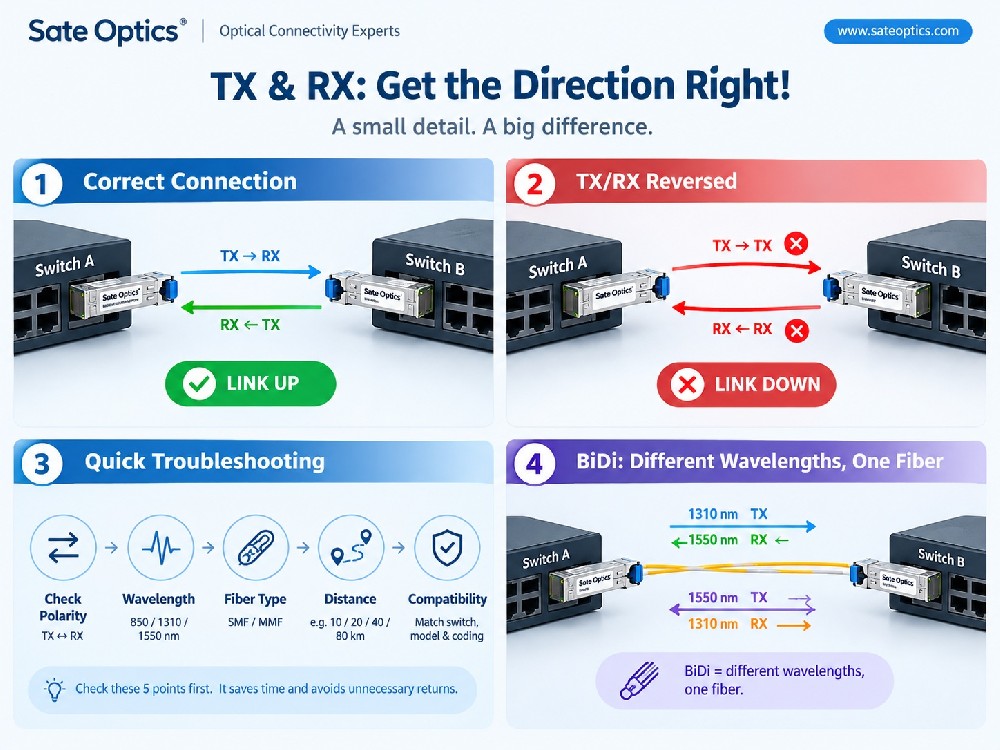
Fiber polarity issues
Remote-side equipment problems
Incorrect wavelength matching
Compatibility issues
3. Module Temperature Is Too High
Excessive temperature can reduce module stability.
Potential reasons include:
Poor airflow
High-density switch environments
Inadequate cooling
Long-term heavy workloads
Monitoring temperature helps identify overheating before failures occur.
4. Voltage Is Abnormal
Unexpected voltage readings may suggest:
Power supply instability
Hardware faults
Switch power issues
Although less common, voltage monitoring provides another valuable diagnostic indicator.
Typical Applications of DOM/DDM
DOM/DDM is widely used in:
Data Centers
Enterprise Networks
ISP Networks
Telecom Infrastructure
Campus Networks
Cloud Computing Platforms
AI and HPC Clusters
Metro Ethernet Networks
For organizations operating hundreds or thousands of optical modules, DOM/DDM greatly simplifies maintenance and proactive monitoring.
Compatible Optical Transceiver Models
DOM/DDM is available on many enterprise and data center optical transceivers, including:
1G SFP
1000BASE-SX SFP
1000BASE-LX SFP
1000BASE-ZX SFP
10G SFP+
SFP-10G-SR
SFP-10G-LR
SFP-10G-ER
SFP-10G-ZR
10G BiDi SFP+
25G SFP28
SFP-25G-SR
SFP-25G-LR
SFP-25G-BiDi
40G QSFP+
QSFP-40G-SR4
QSFP-40G-LR4
100G QSFP28
QSFP-100G-SR4
QSFP-100G-CWDM4
QSFP-100G-LR4
QSFP-100G-ER4
200G / 400G / 800G
QSFP56
QSFP-DD
OSFP
400G DR4
400G FR4
400G LR4
800G OSFP
Best Practices for Using DOM/DDM
To get the most value from digital diagnostics:
Check DOM values before replacing hardware.
Record baseline Tx and Rx Power after installation.
Monitor temperature during peak traffic.
Clean fiber connectors before reconnecting optics.
Compare local and remote DOM values to locate signal loss.
Set monitoring thresholds to detect abnormal changes early.
A few seconds spent reviewing DOM data can prevent hours of unnecessary troubleshooting.
Frequently Asked Questions (FAQ)
What is the difference between DOM and DDM?
There is no functional difference. Different manufacturers use different names, but both refer to Digital Optical Monitoring or Digital Diagnostic Monitoring.
Do all SFP modules support DOM/DDM?
No. Many enterprise-grade SFP, SFP+, SFP28, QSFP28, QSFP-DD, and OSFP modules support DOM/DDM, but some entry-level or legacy modules may not.
How do I check DOM/DDM information?
Most managed switches and routers allow you to view DOM data using the command-line interface (CLI), web management interface, or network monitoring software.
Can DOM/DDM detect dirty fiber connectors?
Not directly. However, contaminated connectors often cause increased insertion loss, which appears as reduced Rx Power. This makes DOM/DDM an excellent tool for identifying contamination-related issues.
Does low Rx Power always mean the optical module is faulty?
No. Low Rx Power is often caused by dirty connectors, damaged fiber, excessive distance, or optical attenuation rather than a defective transceiver.
Conclusion
DOM/DDM is much more than a technical specification—it is one of the most valuable troubleshooting tools built into modern optical transceivers.
By monitoring Tx Power, Rx Power, temperature, voltage, and other diagnostics, engineers can identify issues faster, reduce unnecessary hardware replacement, and improve overall network reliability.
Whether you're deploying SFP, SFP+, SFP28, QSFP+, QSFP28, QSFP-DD, or OSFP transceivers, understanding DOM/DDM can save significant time during installation, maintenance, and troubleshooting.
Need Reliable Optical Transceivers with DOM/DDM Support?
Sate Optics provides fully tested, high-performance compatible optical transceivers for leading networking platforms, including Cisco, Juniper, HPE, Dell EMC, Huawei, Nokia, Arista, and many others.
Whether you need 1G, 10G, 25G, 40G, 100G, 200G, 400G, or 800G optical modules, our solutions are designed for reliable performance, broad compatibility, and complete DOM/DDM support to simplify network monitoring and maintenance.
Contact Sate Optics today to find the right transceiver for your network upgrade or deployment.
Previous:What Does Hot-Swappable Mean in Networking? SFP, QSFP, DAC & AOC Explained
Next:Link Budget Explained: Why 40km SFP Can Fail at 20km | Optical Transceiver Guide