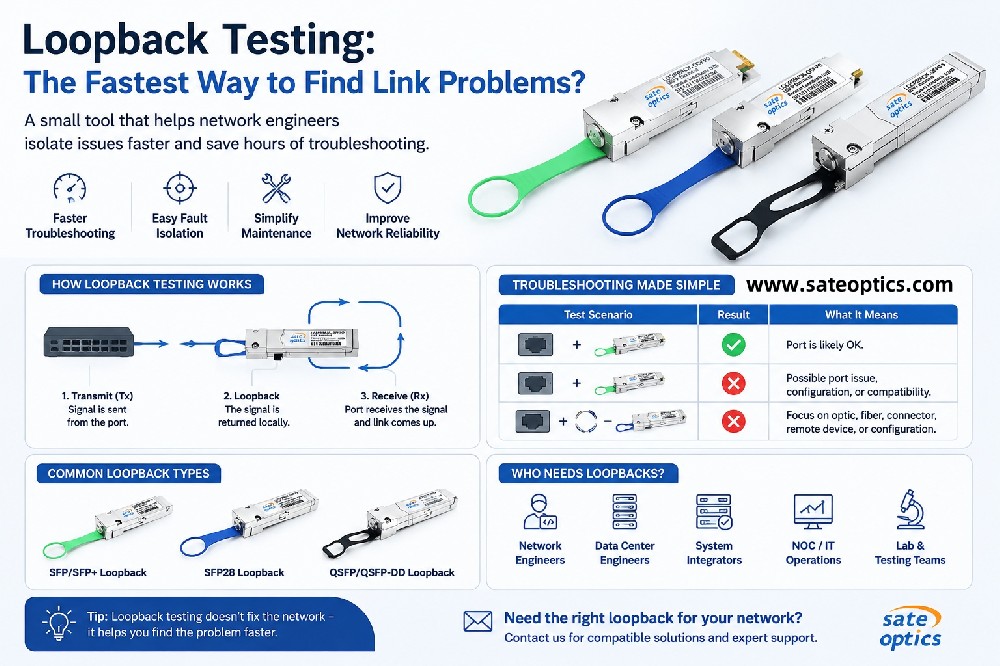

Loopback Testing: The Fastest Way to Find Network Link Problems?
2026-08-26 11:51:48
What Is an Optical Loopback and How Can It Help Troubleshoot SFP, SFP+, SFP28, QSFP, and QSFP-DD Network Links?
When a network link goes down, the hardest part is often not fixing it — it is finding where the problem actually is.
Is it the switch port?
The optical transceiver?
The fiber cable?
The remote device?
Or a configuration issue?
This is where a simple but useful troubleshooting accessory can help: the optical loopback.
A loopback device sends the transmitted signal back toward the receiving side, allowing engineers to test a network interface without requiring a complete connection to another remote device.
For network engineers, data center teams, system integrators, and NOC technicians, a suitable loopback can be a convenient tool for port validation, troubleshooting, installation, and maintenance.
What Is an Optical Loopback?
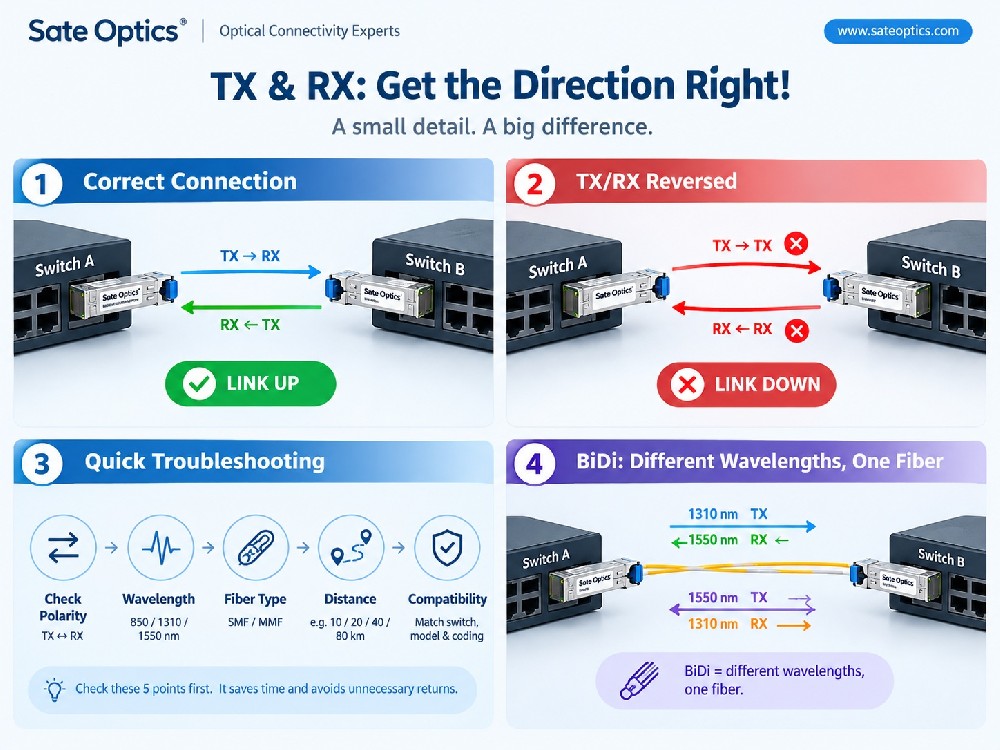
An optical loopback is a testing device designed to connect the Tx (transmit) path back to the Rx (receive) path.
Instead of sending an optical signal through a fiber link to another device, the signal is returned locally.
A simplified test looks like this:
Network Device → Optical Port → Loopback → Same Optical Port
If the port detects the expected signal and establishes link status, the engineer has useful evidence that the interface and part of the transmission path are functioning.
However, a loopback test should not be treated as proof that every component in the complete network path is working. It is primarily a tool for isolating potential fault locations.
Why Do Engineers Use Loopback Testing?
Imagine this situation:
A switch port is not coming up.
You could start replacing components:
Optic → Fiber → Optic → Switch → Remote Device
That can take time, especially when the problem occurs in a large data center.
A loopback provides another troubleshooting step.
A simple troubleshooting approach
Step 1 — Test the port with a compatible loopback
If the expected link or interface behavior appears, the port may be functioning correctly.
Step 2 — Test the normal optical connection
If the loopback works but the production link does not, you can investigate other parts of the path, such as:
Optical transceivers
Fiber patch cables
Connectors
Fiber polarity
Remote equipment
Configuration
Compatibility
Step 3 — Compare the results
The purpose is not simply to make the link work.
The goal is to narrow down the possible fault location.
Who Needs Optical Loopback Products?
Loopback adapters and test modules are especially useful for customers who frequently install, test, or maintain network equipment.
1. Network Engineers
Useful for troubleshooting switch and network interface ports when a link does not come up as expected.
2. Data Center Engineers
Data centers often have large numbers of optical ports. Having compatible testing accessories available can reduce troubleshooting time during maintenance.
3. NOC Teams
Network Operations Center teams can use loopback testing as one part of their remote or on-site troubleshooting workflow.
4. System Integrators
During equipment installation and commissioning, loopbacks can help validate interfaces before the complete network connection is established.
5. IT Maintenance Teams
For organizations maintaining multiple switches, servers, NICs, and optical networks, loopbacks can be useful additions to a network troubleshooting toolkit.
6. Testing and Laboratory Teams
Loopbacks can also be used when testing optical interfaces, equipment, and network configurations in controlled environments.
SFP Loopback vs. QSFP Loopback
Not every loopback is interchangeable.
The form factor and interface need to match the equipment being tested.
Common categories include:
| Loopback Type | Typical Interface |
|---|---|
| SFP Loopback | 1G SFP |
| SFP+ Loopback | 10G SFP+ |
| SFP28 Loopback | 25G SFP28 |
| QSFP+ Loopback | 40G QSFP+ |
| QSFP28 Loopback | 100G QSFP28 |
| QSFP-DD Loopback | 400G / higher-speed QSFP-DD platforms |
Before purchasing a loopback, engineers should verify the form factor, speed, interface, host equipment, and required testing function.
A physically similar module does not automatically mean it is electrically or functionally compatible.
Loopback vs. Replacing the Optical Transceiver
When a link is down, many engineers instinctively replace the optic.
Sometimes that works.
But if the actual problem is the switch port, configuration, fiber, or remote equipment, replacing the transceiver may not solve the problem.
A loopback provides another way to approach the problem:
Test → Isolate → Identify → Replace
rather than:
Replace → Test → Replace again
This can be particularly useful when troubleshooting large deployments where unnecessary component replacement increases both time and cost.
What Can a Loopback Test Tell You?
A loopback can provide useful information about whether an interface can transmit and receive a signal under the test conditions.
It can help engineers investigate:
Port functionality
Interface signal path
Link establishment
Transceiver/interface behavior
Equipment compatibility
Potential physical-layer issues
But remember:
A successful loopback test does not mean the entire network link is healthy.
The complete path may still contain problems involving fiber, connectors, remote optics, configuration, polarity, or other components.
Loopback testing is best used as one step in a structured troubleshooting process.
How to Choose the Right Optical Loopback
Before ordering a loopback product, check these points:
1. Form Factor
Is the interface:
SFP, SFP+, SFP28, QSFP+, QSFP28, QSFP-DD, or another form factor?
2. Data Rate
Make sure the loopback is designed for the interface speed you need to test.
For example:
3. Host Equipment
Check the switch, router, server, NIC, test platform, or other equipment where the loopback will be installed.
4. Compatibility
Some platforms may have specific coding, EEPROM, or compatibility requirements.
For managed network equipment, confirming compatibility before deployment can prevent unnecessary troubleshooting.
5. Testing Purpose
Are you testing:
A switch port?
A NIC?
An optical interface?
A new installation?
A suspected faulty connection?
The answer can influence which loopback configuration is appropriate.
Optical Loopback for Network Troubleshooting
A loopback is a relatively small accessory, but it can play an important role in a network engineer's troubleshooting toolkit.
Instead of immediately asking:
“Which component should I replace?”
a better first question can be:
“Which part of the link can I eliminate from the list of possible problems?”
That is the real value of loopback testing.
It helps turn a vague “link down” problem into a more structured troubleshooting process.
Frequently Asked Questions
What is an optical loopback used for?
An optical loopback is used to return a transmitted signal back to the receiving side so engineers can test and troubleshoot a network interface or optical port.
Can a loopback test an SFP port?
Yes, a compatible SFP or SFP+ loopback can be used for appropriate SFP-family interfaces, depending on the equipment, speed, coding, and testing requirements.
Can I use an SFP loopback in an SFP+ port?
Not necessarily. Physical compatibility does not always mean operational compatibility. Always verify the host equipment and the specific loopback's supported speed and configuration.
What is the difference between SFP and QSFP loopback?
The main difference is the form factor and interface architecture. SFP-family loopbacks are generally used for single-lane interfaces, while QSFP-family loopbacks are designed for multi-lane interfaces.
Does a loopback replace an optical transceiver?
No. A loopback is primarily a testing and troubleshooting accessory, not a replacement for a production optical transceiver.
Can loopback testing identify a bad fiber cable?
It can help narrow down the fault. If a port behaves correctly with a compatible loopback but the normal fiber connection does not, the fiber path and other components become candidates for further investigation.
Do I need loopbacks in a data center?
If your team regularly installs, tests, or maintains optical networking equipment, having compatible loopbacks available can be useful for troubleshooting and port validation.
Common Loopback Product Keywords
If you are looking for compatible optical testing accessories, common search terms include:
SFP Loopback
SFP+ Loopback
SFP28 Loopback
10G SFP+ Loopback
25G SFP28 Loopback
QSFP+ Loopback
QSFP28 Loopback
100G QSFP28 Loopback
QSFP-DD Loopback
400G QSFP-DD Loopback
Optical Loopback Adapter
Fiber Optic Loopback
Network Loopback Tester
Optical Transceiver Loopback
Applications
Optical loopback products can be useful across a range of network environments:
Data Centers
Port validation, maintenance, and optical troubleshooting.
Enterprise Networks
Switch and network interface troubleshooting.
Telecom & ISP Networks
Installation, maintenance, and field diagnostics.
Network Labs
Interface testing and equipment validation.
System Integration
Pre-deployment testing and commissioning.
NOC & IT Operations
Troubleshooting link-down and interface-related issues.
Need the Right Loopback for Your Network?
Choosing the right loopback starts with the same information required for choosing an optical transceiver:
Port type + data rate + equipment + compatibility + testing requirement.
At Sate Optics, we provide optical networking products and compatible accessories for different network environments.
If you need help selecting an SFP, SFP+, SFP28, QSFP+, QSFP28, or QSFP-DD loopback, send us your switch/NIC model and port speed.
We'll help you identify the appropriate option for your application.
Need a loopback for a specific switch or NIC? Contact Sate Optics for compatibility assistance.
Previous:What Really Limits Network Speed? 5 Bottlenecks You Should Check
Next:Multimode Fiber and SR Transceivers: How to Choose the Right Combination