
How to Choose the Right Network Switch: 7 Key Factors to Check
2026-08-17 14:30:21
How to Choose the Right Network Switch: 7 Things to Check Before You Buy
Choosing a network switch is not simply about counting ports or finding the lowest price. The right switch needs to match your network traffic, uplink requirements, optical transceivers, fiber infrastructure, management needs, power environment, and future growth.
Whether you are building an enterprise network, upgrading a data center, expanding an ISP PoP, or deploying a fiber-based access network, making the right switch selection early can help avoid compatibility problems and unnecessary replacement costs later.
In this guide, we explain 7 important factors to consider when choosing a network switch, including switch port speed, uplink capacity, optical transceiver compatibility, fiber requirements, network management, power and cooling, and future scalability.
1. Start With Port Density and Port Speed
The first question is simple:
How many devices do you need to connect, and at what speed?
Network switches are available with different combinations of access ports and uplink ports, including:
1G Ethernet
10G Ethernet
25G Ethernet
40G Ethernet
100G Ethernet
200G and 400G uplinks for higher-density environments
For example, a 48-port switch may be designed for 1G access connections with higher-speed uplinks, while another 48-port switch may provide 10G access ports.
The right choice depends on the devices connected to the switch and the traffic they generate.
What to check:
Number of access ports
Port speed
Copper or fiber interfaces
Number and speed of uplink ports
Whether additional ports will be needed in the future
More ports do not automatically mean better performance. Port density needs to match the actual network design.
2. Don't Ignore Uplink Capacity
One of the most commonly overlooked factors in switch selection is uplink capacity.
Imagine two switches:
Switch A:
48 × 1G access ports + 4 × 10G uplinks
Switch B:
48 × 1G access ports + 4 × 25G uplinks
Both provide 48 access ports, but their uplink capabilities are different.
If traffic from many access ports needs to reach servers, aggregation switches, storage systems, or the core network, uplink capacity can become an important consideration.
This is why you should evaluate the complete traffic path rather than looking only at the number of front-panel ports.
Important specifications include:
Number of uplinks
Uplink speed
Uplink interface type
Switching capacity
Packet forwarding performance
Network topology
Potential oversubscription
The goal is not simply to buy the switch with the highest specification. It is to select a switch whose access and uplink capacity match the expected traffic pattern.
3. Check Optical Transceiver Compatibility Before Ordering
For fiber-based networks, switch selection and transceiver selection should be considered together.
A switch may have an SFP+, SFP28, QSFP28, or QSFP-DD port, but that does not mean every module with the same form factor will necessarily be supported.
Before purchasing optical modules, check the switch manufacturer's specifications and supported optics.
Key compatibility factors include:
Form factor
Ethernet data rate
Fiber type
Transmission distance
Operating wavelength
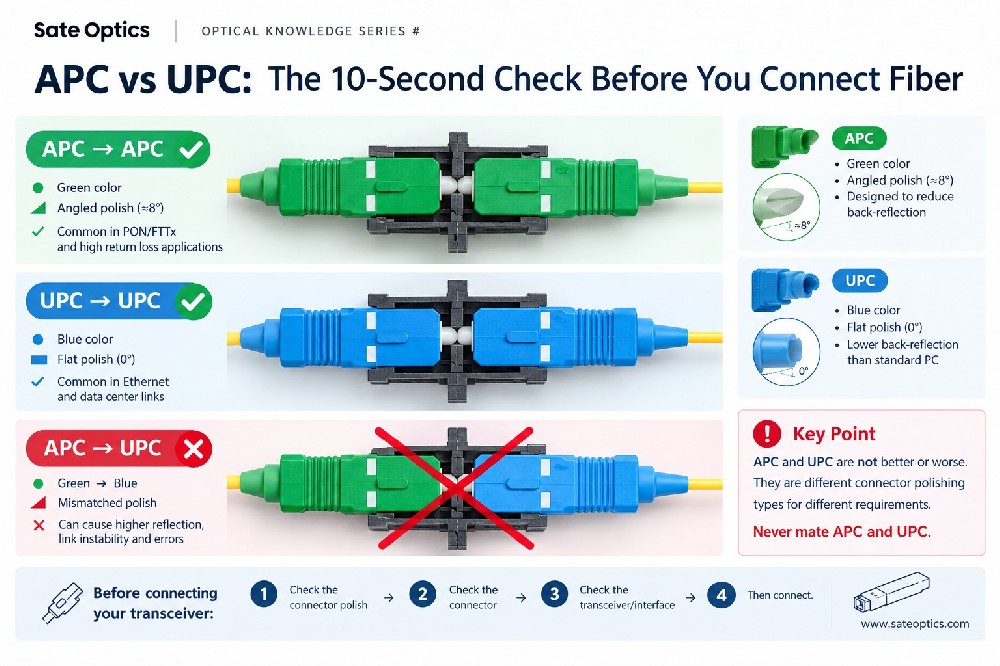
Connector type
DOM/DDM requirements
Vendor coding or compatibility requirements
Breakout requirements
Supported transceiver list
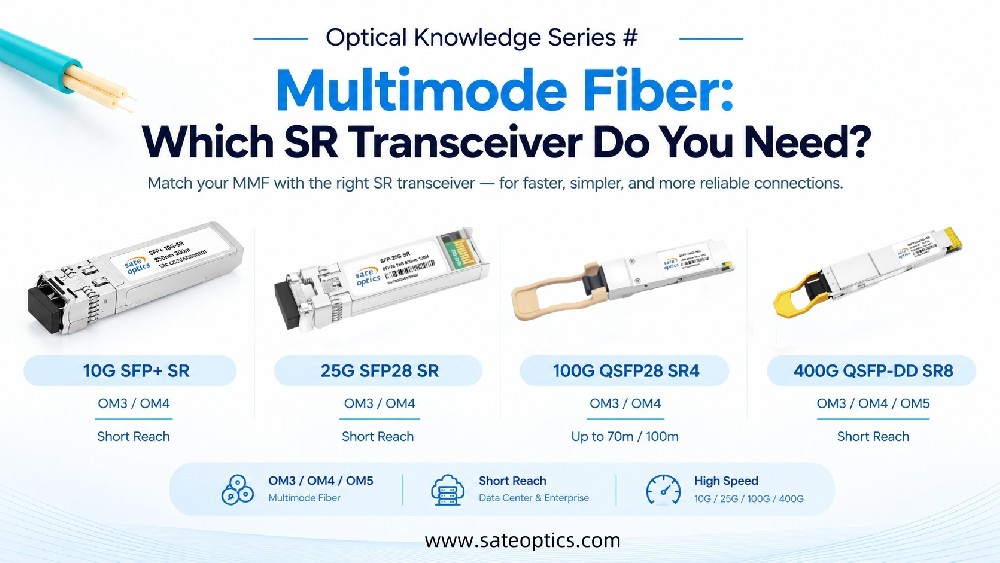
For example, common optical transceiver categories include:
10G SFP+
SFP-10G-SR
SFP-10G-LR
SFP-10G-ER
25G SFP28
SFP-25G-SR
SFP-25G-LR
100G QSFP28
QSFP-100G-SR4
QSFP-100G-LR4
QSFP-100G-ER4
400G QSFP-DD
400G QSFP-DD SR8
400G QSFP-DD DR4
400G QSFP-DD FR4
400G QSFP-DD LR4
The exact compatibility of each module depends on the switch platform, firmware, coding requirements, optical specifications, and network design.
A 10G SFP+ port does not automatically mean that every 10G SFP+ transceiver will work.
This is one of the reasons it is important to verify compatibility before placing a large optics order.
4. Match the Switch With Your Fiber Infrastructure
Choosing the switch is only one part of a fiber network design.
The optical transceiver and fiber patching also need to match the existing infrastructure.
Single-mode vs. multimode fiber
For example:
Single-mode fiber (SMF) is commonly used for longer-distance links and telecom, ISP, and data center interconnection applications.
Multimode fiber (MMF) is commonly used for shorter-distance applications, particularly within buildings and data centers.
The required transmission distance also matters.
A 10G link over a short multimode connection may use a different optical module from a 10G long-distance single-mode link.
Before selecting optics, confirm:
SMF or MMF
Required transmission distance
Operating wavelength
Connector type
Fiber infrastructure
Patch cord type
Link budget where applicable
For example, an SFP-10G-SR and SFP-10G-LR are both 10G SFP+ transceivers, but they are designed for different fiber and distance requirements.
The same principle applies to SFP-25G-SR, SFP-25G-LR, QSFP-100G-SR4, and QSFP-100G-LR4.
5. Choose the Right Network Management Features
A switch should provide the management functions your network actually needs.
Depending on the switch type and application, useful features may include:
VLAN
LACP
STP / RSTP / MSTP
QoS
ACL
LLDP
SNMP
Network monitoring
Telemetry
CLI
Web-based management
API support
Static routing or dynamic routing on Layer 3-capable switches
However, more features are not necessarily better.
For a small business network, an advanced feature set may be unnecessary.
For an ISP, data center, or large enterprise network, advanced management, monitoring, redundancy, and routing capabilities may be much more important.
The best switch is the one that provides the right features for your network—not simply the longest specification sheet.
6. Consider Power Consumption and Cooling
Power and thermal performance can become increasingly important as switch port density increases.
A switch installed in a small office environment has different requirements from a switch deployed in a:
Data center rack
ISP PoP
Telecom cabinet
Network operations room
High-density server environment
Before deployment, consider:
Power consumption
Power supply configuration
PSU redundancy
Fan design
Airflow direction
Operating temperature
Rack density
24/7 operating requirements
For high-density environments, thermal design should be considered together with the total power consumption of the network equipment and connected optics.
7. Think About Future Network Growth
A switch may meet today's requirements but become a limitation as the network grows.
Before making a purchase, consider what the network could look like over the next 2–3 years.
Ask:
Will the number of connected devices increase?
Will endpoint speeds increase from 1G to 10G or 25G?
Will uplink bandwidth need to increase?
Will additional fiber connections be required?
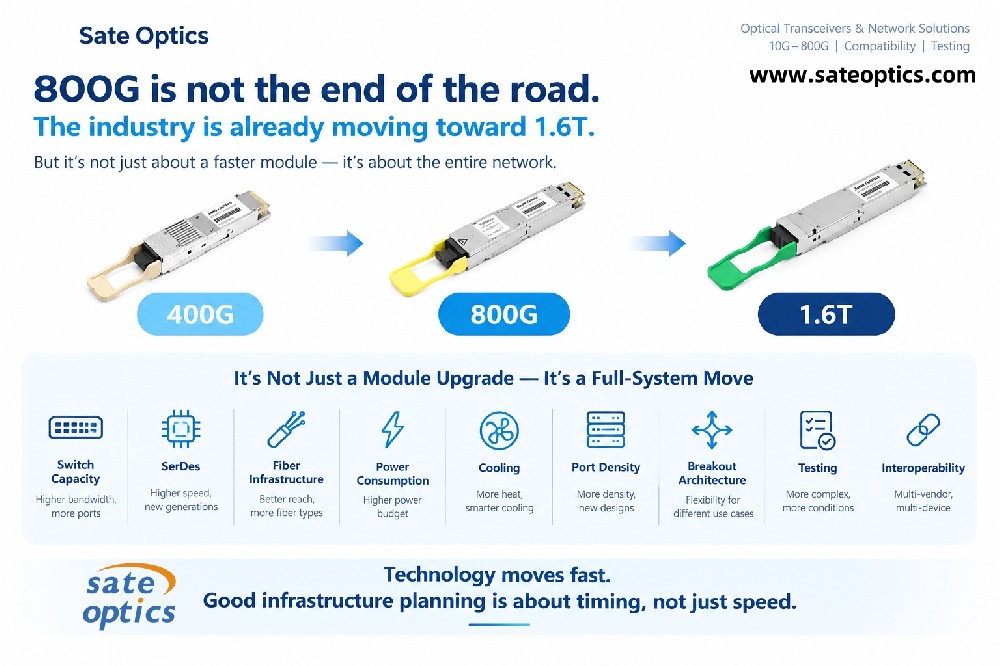
Will higher-speed optical transceivers be needed?
Can the existing switch architecture support future expansion?
For example, a business that currently needs 10G uplinks may eventually require 25G or 100G aggregation.
This does not mean you should always buy the most expensive switch available.
Instead, look for a reasonable balance between current requirements, expansion capability, and total cost of ownership.
Network Switch Selection by Application
Different networks have different priorities.
Enterprise Networks
Enterprise networks may prioritize:
Reliable access connectivity
VLAN and QoS support
Network monitoring
1G/2.5G/5G/10G access
10G/25G uplinks
Easy management
A switch should be selected based on the number of users, endpoint speed, application traffic, and expected growth.
Data Centers
Data centers typically place greater emphasis on:
High-speed server connectivity
25G / 100G / 400G networking
High-capacity uplinks
Low latency
Redundancy
Optical transceiver compatibility
Efficient airflow and power management
Optical module selection becomes particularly important when deploying high-speed links.
Common optics may include SFP-25G-SR, SFP-25G-LR, QSFP-100G-SR4, QSFP-100G-LR4, and various 400G QSFP-DD solutions depending on the architecture.
ISP and Telecom Networks
ISP and telecom environments may require:
High port density
Long-distance fiber connectivity
10G / 25G / 100G uplinks
Network redundancy
Advanced routing and management
High optical availability
Reliable 24/7 operation
In these environments, switch and optical transceiver compatibility should be evaluated as part of the complete network design.
System Integrators and Network Resellers
System integrators often need flexibility because different customer projects may use different network platforms.
Important considerations include:
Multi-vendor compatibility
Availability of optical transceivers
Different reach options
Multiple data rates
Consistent product coding
Testing before shipment
Technical support
Lead time
Having a reliable optical transceiver supplier can simplify procurement when a project requires multiple switch platforms or different optical specifications.
A Practical Network Switch Buying Checklist
Before placing an order, check these seven areas:
✓ Port Density
How many devices need to be connected?
✓ Port Speed
Do you need 1G, 10G, 25G, 100G, or higher?
✓ Uplink Capacity
Will the uplinks provide enough capacity for the expected traffic?
✓ Transceiver Compatibility
Are the required SFP, SFP+, SFP28, QSFP28, or QSFP-DD modules supported?
✓ Fiber Requirements
Do the optics match the fiber type, distance, wavelength, and connector?
✓ Management & Reliability
Does the switch provide the required VLAN, LACP, QoS, monitoring, redundancy, and routing features?
✓ Future Growth
Will the switch still meet your requirements as the network expands?
Why Switch and Transceiver Selection Should Be Considered Together
A network switch is only one component of a complete connectivity solution.
The final link may include:
Switch → Optical Transceiver → Fiber Patch Cord → Fiber Infrastructure → Optical Transceiver → Switch
A problem with any part of this chain can affect link performance.
That's why selecting the switch first and thinking about the optics later can sometimes create avoidable compatibility or deployment issues.
At Sate Optics, we work with optical transceivers, network switches, DAC, AOC, and fiber connectivity solutions to help customers build compatible network connections across different applications.
Our optical portfolio covers common speeds from 1G to 800G, including SFP, SFP+, SFP28, QSFP28, QSFP-DD, and related high-speed solutions.
Frequently Asked Questions
What should I consider first when choosing a network switch?
Start with the number of connected devices, required port speeds, uplink capacity, and network application. Then evaluate management features, optical compatibility, power requirements, and future expansion.
Is a switch with more ports always better?
No. Port count is only one specification. A switch with more ports may not be the best choice if its uplink capacity, management features, or optical compatibility do not match your network.
Can I use any SFP+ transceiver in a 10G switch?
Not necessarily. Although SFP+ is a standardized form factor, switch platforms can have specific compatibility, coding, firmware, optical, or supported-module requirements. Always verify the switch manufacturer's specifications before deployment.
What is the difference between SFP+, SFP28 and QSFP28?
SFP+ is commonly used for 10G applications, while SFP28 is commonly used for 25G applications. QSFP28 is commonly used for 100G applications and can use multiple optical lanes depending on the transceiver design.
Which optical module should I use for a 10G switch?
It depends on the required distance, fiber type, wavelength, connector, and switch compatibility. Common 10G SFP+ options include SFP-10G-SR for suitable short-reach applications and SFP-10G-LR for longer single-mode fiber links.
What should I check when connecting a 100G switch?
Check the switch port type, required 100G transceiver form factor, fiber type, transmission distance, connector, optical lane configuration, and compatibility requirements. Common 100G options include QSFP-100G-SR4 and QSFP-100G-LR4, depending on the network design.
Should I buy a higher-speed switch for future growth?
Not automatically. Future-proofing should be based on realistic traffic growth, expansion plans, uplink requirements, and budget. The goal is to leave enough capacity for expected growth without paying for unnecessary features or bandwidth.
Final Thoughts: Choose for the Network, Not Just the Price
The right network switch is not necessarily the one with the most ports or the lowest purchase price.
A better approach is to evaluate the complete network connection:
Port capacity + uplinks + transceiver compatibility + fiber + management + power + future growth
When these factors are considered together, it becomes much easier to select equipment that fits the actual application and reduces the risk of compatibility problems during deployment.
If you are planning a 10G, 25G, 100G, 400G, or higher-speed network, Sate Optics can help you evaluate the optical transceiver and connectivity requirements alongside your switch selection.
Need Help Choosing the Right Switch or Optical Transceiver?
Send us your switch model, required speed, fiber type, transmission distance, and quantity.
Our team can help you identify suitable optical transceiver options and connectivity solutions for your application.
Contact Sate Optics today to discuss your next network project.
Previous:FEC in 400G and 800G Optical Transceivers | Sate Optics
Next:What Really Limits Network Speed? 5 Bottlenecks You Should Check