
Why Checking DOM/DDM First Can Save Days of Unnecessary SFP Troubleshooting
2026-05-11 19:16:24
Why Checking DOM/DDM First Can Save Days of Unnecessary SFP Troubleshooting
Stop Replacing Optical Modules Before Checking the Data
When a fiber link becomes unstable, many engineers immediately suspect the optical transceiver.
Typical first reactions include:
“The SFP must be bad.”
“Let’s replace the module.”
“Maybe this third-party optic is incompatible.”
Sometimes that’s true.
But in many real-world networks, replacing the transceiver too early wastes time, increases cost, and delays root-cause analysis.
A smarter first step?
Check the DOM/DDM values.
What Is DOM/DDM in Optical Modules?
DOM (Digital Optical Monitoring), also called DDM (Digital Diagnostic Monitoring), is a built-in monitoring feature available in many modern SFP transceiver, SFP+ transceiver, and QSFP transceiver modules.
It provides real-time diagnostic information directly from the transceiver.
Typical monitored values include:
Tx Power (Transmit Optical Power)
Rx Power (Receive Optical Power)
Temperature
Supply Voltage
Laser Bias Current
Alarm and Warning Thresholds
These values often reveal the real problem before any hardware replacement is needed.
Why DOM/DDM Should Be Checked First
1. Rx Power Can Reveal Fiber Problems Immediately
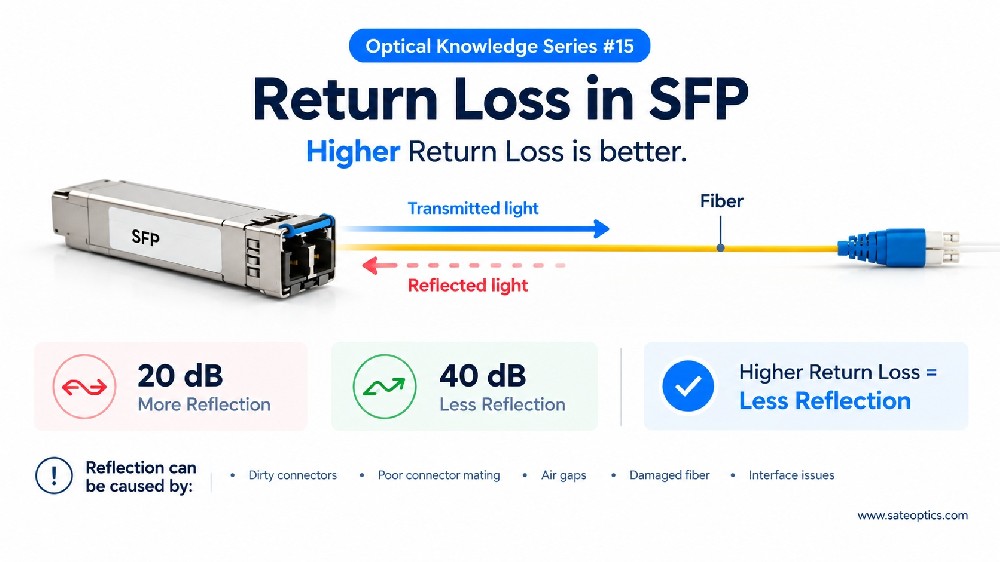
Low receive power may indicate:
dirty connectors
excessive insertion loss
damaged fiber
poor splices
incorrect patching
Without checking Rx power, engineers may incorrectly blame the transceiver.
2. Tx Power Helps Identify Laser Issues
If transmit power is outside normal range, possible causes include:
aging laser components
module degradation
thermal stress
defective optics
This is one of the few cases where the SFP itself may truly be the issue.
3. Temperature Can Explain Intermittent Link Drops
A module that works at room temperature may fail under load.
High temperature can cause:
unstable links
intermittent packet loss
DOM alarm triggers
shortened module lifespan
Temperature-related failures are often misdiagnosed as random compatibility problems.
4. Bias Current Shows Laser Health
Rising bias current usually means the laser is compensating for aging.
This can be an early warning sign before complete failure.
Replacing optics only after this evidence is far more effective.
5. Alarm Thresholds Prevent Guesswork
Most transceivers include warning and critical thresholds.
Ignoring them turns troubleshooting into guesswork.
Or as many engineers call it:
“Debugging by chance.”
Why Logs Matter as Much as DOM/DDM
DOM data tells you what the module sees.
System logs tell you how the switch reacts.
This is where many teams miss the real issue.
Common hidden causes include:
firmware bugs
unsupported transceiver policies
EEPROM interpretation errors
auto-negotiation failures
vendor compatibility restrictions
For example, on Cisco Systems platforms, many engineers overlook the command:
service unsupported-transceiver
Without understanding how the platform handles unsupported optics, teams may spend days swapping modules that were never faulty.
Sometimes even OEM optics get returned unnecessarily.
Common Mistake: Replacing SFPs Before Reading Data
A typical bad troubleshooting workflow looks like this:
Link fails
Replace SFP
Link still fails
Replace fiber
Change vendor
Blame optics
A better workflow:
Check DOM/DDM
Review switch logs
Verify firmware
Check compatibility policy
Inspect physical layer
Replace optics only if evidence supports it
This saves time and budget.
Best Practice Checklist for Optical Troubleshooting
Before replacing any transceiver, always verify:
Optical Layer
✅ Rx power
✅ Tx power
✅ fiber cleanliness
✅ connector quality
✅ total link budget
Module Health
✅ temperature
✅ voltage
✅ bias current
✅ DOM alarms
System Layer
✅ switch logs
✅ firmware version
✅ port settings
✅ FEC / negotiation
✅ vendor coding rules
Only after these steps should optics be considered the root cause.
Final Takeaway
Optical modules are often blamed first because they are easy to swap.
But experienced engineers know:
the first suspect is not always the real problem.
DOM/DDM data and log analysis usually tell the truth faster than repeated hardware replacement.
Before changing another SFP, ask:
“What is the module actually telling me?”
That single step may save days of unnecessary troubleshooting.
Previous:Why Some “Optics Problems” Are Not Actually Optics Problems
Next:Understanding Transceiver Types: SFP, QSFP, DAC, AOC, CWDM & DWDM Explained