
Why Do Ethernet Cables Have Different Colors? Does Cable Color Affect Network Speed?
2026-07-17 15:05:25
Why Do Ethernet Cables Come in Different Colors?
If you have ever worked with network cables, you have probably seen Ethernet cables in many colors:
Blue, yellow, red, green, black, orange…
A common question from IT teams is:
"Does the color of an Ethernet cable affect its speed or performance?"
The answer is simple:
No.
Ethernet cable color does not determine bandwidth, transmission speed, or network performance.
Instead, colors are mainly used for network organization, identification, and maintenance efficiency.
The real performance depends on:
Cable category (Cat5e, Cat6, Cat6A, Cat8)
Cable construction
Connector quality
Network equipment capability
Distance requirements
Understanding the difference can help engineers choose the right connectivity solution and avoid unnecessary upgrades.
What Do Different Ethernet Cable Colors Mean?
There is no universal standard that defines Ethernet cable colors.
Different companies and data centers create their own color management systems based on their operational requirements.
Common examples include:
🔵 Blue Ethernet Cable
Often used for:
General network connections
Desktop computers
Office devices
Standard LAN connections
🟡 Yellow Ethernet Cable
Often used for:
PoE devices
Security cameras
Wireless access points
Special network services
🔴 Red Ethernet Cable
Often used for:
Critical connections
Important infrastructure links
Emergency or priority networks
🟢 Green Ethernet Cable
Often used for:
Security systems
Specific network segments
Dedicated connections
⚫ Black Ethernet Cable
Often used for:
Backbone connections
Server rooms
Permanent installations
However:
A blue Cat6 cable and a yellow Cat6 cable have the same performance.
The category printed on the cable jacket matters more than the color.
Ethernet Cable Categories Explained: Cat5e vs Cat6 vs Cat6A vs Cat8
When selecting Ethernet cables, engineers should focus on the cable category.
Cat5e Ethernet Cable
Typical applications:
Home networks
Office networks
Basic LAN connections
Performance:
Up to 1Gbps
Maximum distance: 100 meters
Cat6 Ethernet Cable
Typical applications:
Enterprise networks
Small server rooms
Higher-speed LAN environments
Performance:
1Gbps up to 100 meters
10Gbps for shorter distances
Cat6A Ethernet Cable
Cat6A is designed for reliable 10G Ethernet.
Applications:
Data center access networks
Enterprise backbone connections
High-performance LAN environments
Performance:
10Gbps
Up to 100 meters
Cat8 Ethernet Cable
Cat8 is designed for extremely short high-speed copper connections.
Applications:
Server racks
High-density data center environments
Performance:
25G / 40G Ethernet
Usually up to 30 meters
Why Are Data Centers Moving Beyond Traditional Ethernet Cables?
RJ45 copper Ethernet remains popular because it is:
✔ Easy to install
✔ Low cost
✔ Widely supported
However, modern data centers require much higher bandwidth.
Today's networks are moving toward:
25G → 100G → 400G → 800G
At these speeds, fiber-based connectivity provides advantages:
Longer transmission distance
Lower signal loss
Higher bandwidth density
Better scalability
This is why modern data centers increasingly use:
DAC cables
AOC cables
Fiber optic cables
Optical transceivers
From RJ45 to Optical Transceivers: Choosing the Right Connectivity
Different network environments require different solutions.
RJ45 Ethernet (Copper)
Best for:
Office networks
PCs
IP phones
Wi-Fi access points
Small server rooms
Common speeds:
1G
2.5G
5G
10G
DAC Cable (Direct Attach Copper)
DAC cables are widely used for short-distance high-speed connections.
Applications:
Server-to-switch connections
Rack-to-rack connections
Top-of-rack networking
Common solutions:
10G SFP+ DAC
25G SFP28 DAC
40G QSFP+ DAC
100G QSFP28 DAC
400G QSFP-DD DAC
Advantages:
Low latency
Cost-effective
Low power consumption
AOC Cable (Active Optical Cable)
AOC combines optical fiber and integrated transceivers.
Applications:
Data centers
HPC clusters
AI infrastructure
Common solutions:
100G QSFP28 AOC
200G QSFP56 AOC
400G QSFP-DD AOC
Advantages:
Longer distance than DAC
Flexible installation
Reduced cable weight
Fiber Optic Cable + Optical Transceivers
For high-speed and long-distance networks, optical transceivers are the preferred solution.
Common products include:
SFP Series
1G SFP
10G SFP+
BiDi SFP
Applications:
Enterprise networks
Access networks
Telecom systems
SFP28 Series
Examples:
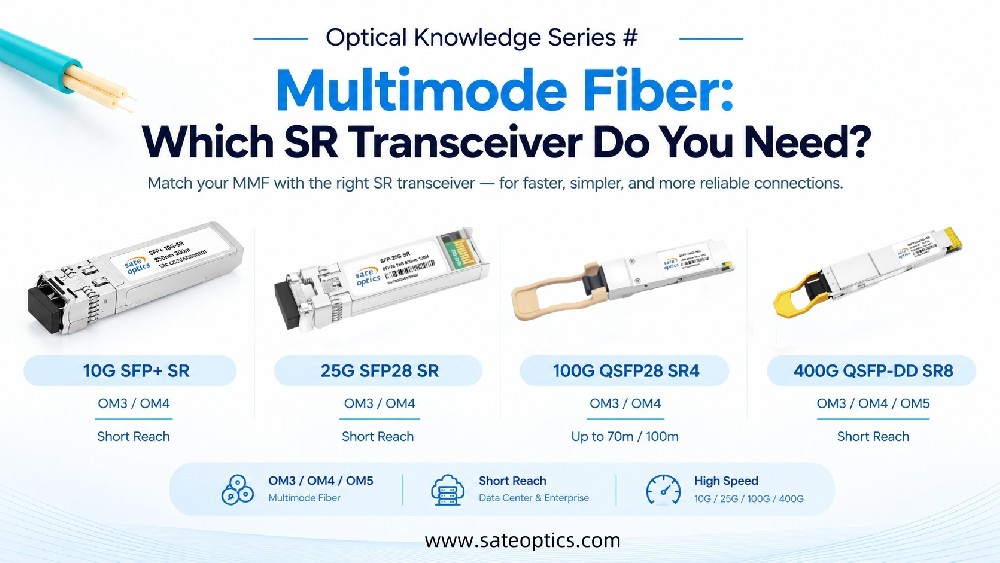
25G SFP28 SR
25G SFP28 LR
Applications:
Data center servers
25G switches
QSFP28 Series
Examples:
100G QSFP28 SR4
100G QSFP28 LR4
100G QSFP28 ER4
Applications:
Cloud data centers
Enterprise backbone
QSFP-DD Series
Examples:
400G QSFP-DD SR8
400G QSFP-DD DR4
400G QSFP-DD FR4
400G QSFP-DD LR4
Applications:
AI clusters
Hyperscale data centers
High-performance computing
OSFP Series
Examples:
800G OSFP SR8
800G OSFP DR8
Applications:
Next-generation AI networks
Ultra-high bandwidth data centers
Application Scenarios
Enterprise Networks
Recommended:
Cat6/Cat6A Ethernet cables
1G/10G RJ45 solutions
SFP/SFP+ uplinks
Data Centers
Recommended:
25G SFP28
100G QSFP28
DAC/AOC cables
MPO fiber connectivity
AI and HPC Infrastructure
Recommended:
400G QSFP-DD
800G OSFP
High-density fiber solutions
Telecom Networks
Recommended:
Long-distance optical transceivers
CWDM/DWDM solutions
Fiber optic connectivity
FAQ: Ethernet Cable Colors and Network Speed
Q1: Does Ethernet cable color affect speed?
No.
Cable color only helps with organization and identification. Speed depends on cable category, equipment, and network design.
Q2: Is a blue Ethernet cable faster than a yellow cable?
No.
A Cat6 blue cable and Cat6 yellow cable provide the same performance.
Q3: What is the difference between Cat6 and Cat6A?
Cat6 supports 10G Ethernet at shorter distances, while Cat6A supports reliable 10G transmission up to 100 meters.
Q4: Can Cat8 replace fiber optic cables?
Not usually.
Cat8 supports high-speed copper connections over short distances, but fiber is preferred for longer distances and higher-speed networks such as 400G and 800G.
Q5: When should I use DAC instead of optical transceivers?
DAC is ideal for short-distance rack connections.
Optical transceivers are better for longer distances, higher bandwidth, and scalable data center networks.
Q6: What optical transceiver should I choose for 100G or 400G networks?
The choice depends on:
Distance
Fiber type
Switch compatibility
Network architecture
Common choices include:
100G QSFP28 SR4/LR4/ER4
400G QSFP-DD SR8/DR4/FR4/LR4
Conclusion: Color Helps Organization, Technology Defines Performance
Ethernet cable colors make network management easier.
But they do not determine speed.
The real decision comes from understanding:
Cable Category + Distance + Bandwidth Requirement + Network Architecture
From traditional RJ45 connections to advanced 800G optical networks, choosing the right connectivity solution helps build faster, more reliable, and future-ready infrastructure.
Upgrade Your Network Connectivity with Sate Optics
Sate Optics provides compatible optical transceivers, DAC cables, AOC cables, and fiber connectivity solutions from 1G to 800G.
Our solutions support:
✔ Data Centers
✔ Telecom Networks
✔ Cloud Infrastructure
✔ AI/HPC Applications
✔ Enterprise Networks
Need help choosing the right SFP, QSFP, QSFP-DD, OSFP, DAC or AOC solution?
Contact Sate Optics today for professional network connectivity support.
Ethernet cable colors, Cat5e vs Cat6, Cat6A Ethernet cable, Cat8 cable, RJ45 Ethernet, DAC cable, AOC cable, SFP transceiver, SFP28, QSFP28, QSFP-DD, OSFP 800G, optical transceiver, data center networking.
Previous:Why Are MPO Cables Used in 40G and 100G Networks? | MPO vs LC Guide
Next:Why Can't Fiber Optic Cables Be Bent Too Much? | Bend Radius, Signal Loss & SFP Troubleshooting